Best App to Learn Spanish Vocabulary (2026)

Almost everyone learning Spanish has at least one app on their phone. Often two or three: one for lessons, one for flashcards, and a translator just in case. Yet ask how many new words they've actually learned in the past month, and whether they could use those words in a conversation, and the answer usually gets vague.
It's rarely a discipline problem. The app is simply built for a different job than the one you have. Here's what to look for in a vocabulary app in 2026, how the main types of apps really differ, and how to find out in one week whether the one you picked works for you.
Six requirements for a vocabulary app
Strip away the marketing and a useful vocabulary app has to cover six things.
| What it must do | Why it matters |
|---|---|
| Accept any word you give it | The words you actually need come from your own life: a show, a chat, a work call. They aren't in anyone's prebuilt course |
| Give context, not just a translation | A bare «word — translation» pair is gone in two days. An example sentence and a definition stick far better |
| Review on a schedule | Forgetting follows a curve: with no review, little survives a week. Spaced repetition puts each review right when the word starts to fade |
| Make you recall, not recognize | Spotting a word among four options is easy. Pulling it out of your head with no prompts is a different skill — and it's the one you need when speaking |
| Include audio and pronunciation | A word you've never heard or said out loud won't register in conversation, and you won't dare use it |
| Fit into an ordinary day | An app that demands half an hour gets abandoned. An app that takes 5–10 minutes survives long enough to produce results |
Now for how the different types of apps handle those six points.
What the main types of apps actually do
| Type | Examples | Strength | What's missing |
|---|---|---|---|
| Gamified courses | Duolingo and similar | Keep the habit alive, give you basic grammar and your first few hundred words | You learn words from someone else's syllabus. You can't add your own |
| Flashcard systems | Anki | The best review algorithm, complete freedom to configure | Every card is built by hand; the setup barrier scares people off |
| Prebuilt card decks | Quizlet, Memrise | Plenty of ready-made sets by topic and by textbook | The decks are someone else's and often mediocre; the drills stay shallow |
| Translators | Google Translate, DeepL | Clear up confusion instantly | They memorize nothing for you: translated and forgotten |
| Apps built on your words | VibeLing | You add a word from your own life and the app turns it into a card with examples and schedules it for review | You do have to notice and add new words now and then |
That's the real fork in the road: study someone else's list or build your own. We've covered both extremes in detail — why Duolingo alone isn't enough to build vocabulary, and why Anki puts off most beginners.
Why your own words beat ready-made lists
A ready-made list is an average across everybody. It contains words you've known for ten years and words you'll never need. You work through the whole set honestly and lose half your time.
Words from your life work differently. You heard agobiado (overwhelmed) in a show, saw prórroga del plazo (deadline extension) in a work email, tripped over reacio (reluctant) in an article. Each of those words already comes with a story and a situation attached. That's exactly what memory latches onto. And the odds you'll meet the word again are much higher — you didn't run into it by accident.
Easy to test: think of any Spanish word you know for certain. You almost certainly also remember where you first heard it.
How VibeLing handles it
VibeLing is built around one idea: the app should accept any word or phrase you've run into and do the rest of the work itself.
You type the word into search — in Spanish or in English, whichever is easier. The app pulls the translation, transcription, audio, definition and several example sentences. You end up with a complete card that would have taken you five minutes to build by hand.
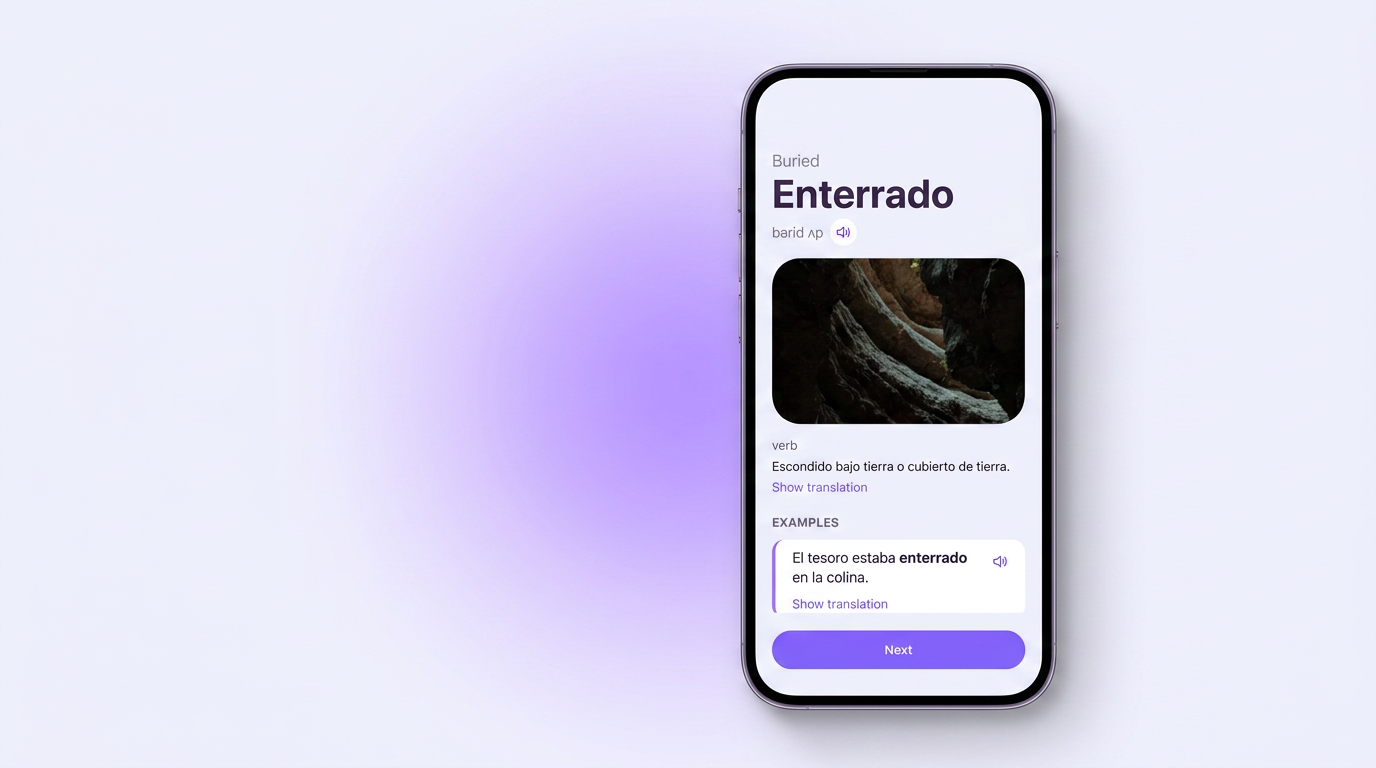
Words collect in your personal dictionary and in collections: «Shows», «Work», «Travel» — however you like. Each word shows its learning progress, so you can see which ones have settled in and which are still hanging by a thread.
Drills: recall, not recognition
Flipping through cards feels like work but produces almost nothing. A word starts to stick when you pull it out of memory yourself. So in VibeLing every word goes through several types of exercise:
- Memorization — a card with the word and its audio; you answer honestly whether you remember the translation or not;
- Pick the translation — recognition among similar options;
- Missing word — a sentence with a gap where the right word belongs; this is already close to real speech;
- Spelling — assemble the word from letters, so it doesn't live only in your ear;
- Pronunciation — say the word out loud into the microphone.
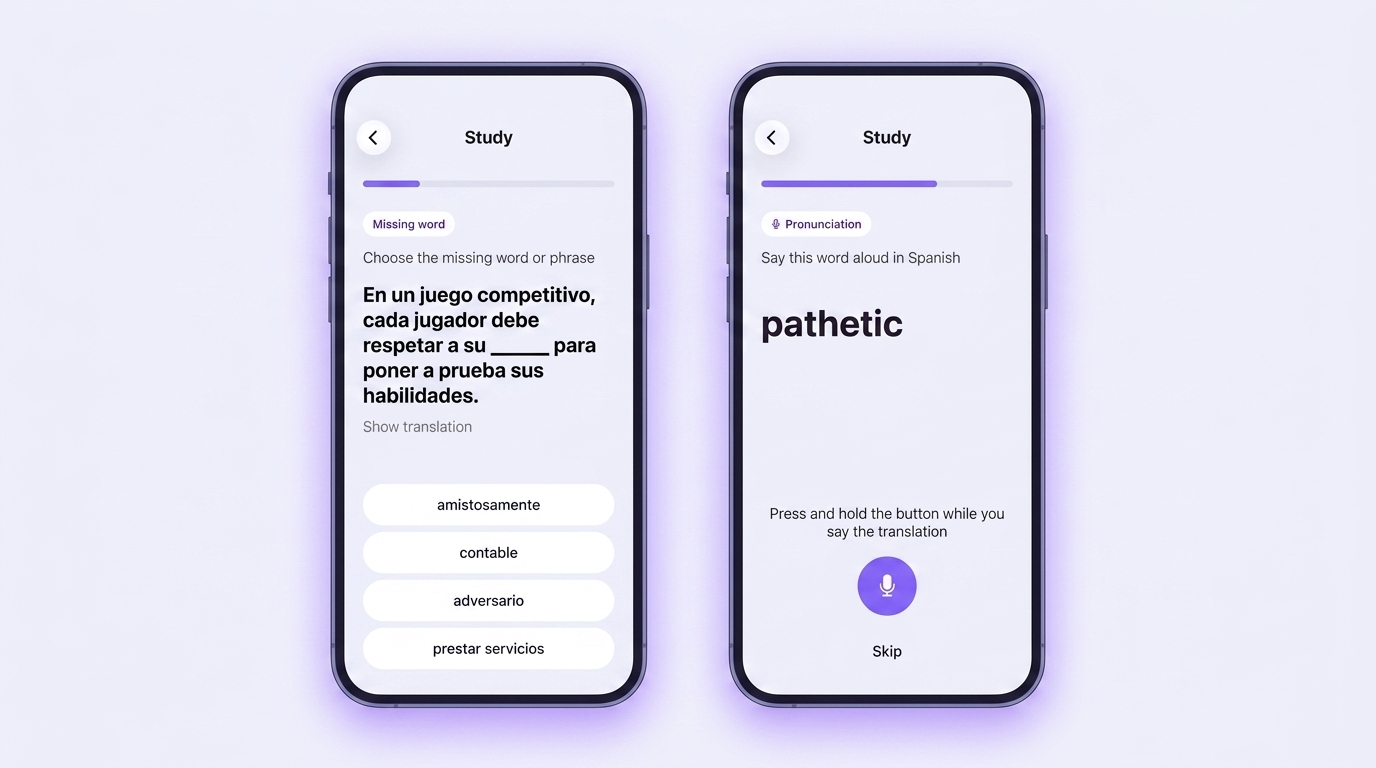
Words don't come back in order but on a spaced repetition schedule: whatever gives you trouble returns more often, and what you know solidly shows up less and less. The daily plan breaks into short sessions of ten words, so one round takes a few minutes and genuinely fits into a queue or a commute.
The one-week test: does this app work for you?
Instead of reading more reviews, just check it yourself. Give it a week:
- Day 1. Add 10 words you've run into over the past few days in real life: in a film, a chat, an article. If the app won't let you add your own words, it's already out.
- Days 2–6. Practise 5–10 minutes a day, no more. The point is to see whether the app fits an ordinary day, not to run a marathon.
- Day 7. Take a sheet of paper and write the translation of all ten words from memory, with no prompts. Then try to build sentences with five of them.
Seven or eight out of ten recalled, and decent sentences with at least half — the app is working. Three or four — you spent the week recognizing words instead of recalling them, and it's worth changing the drill format.
Common questions
How many words a day is realistic?
For most adults studying on the side, a sensible pace is 5–15 new words a day, provided the old ones get reviewed regularly. Thirty new words a day with no review gives you a sense of progress and almost no result a month later.
Do you have to pay?
You can start free almost everywhere, and that's enough to tell whether the format suits you. Paying makes sense only for what genuinely saves you time: automatic card building, audio, proper review scheduling. Paying for access to someone else's word lists is a shakier proposition.
Does an app replace lessons with a teacher?
No, and it shouldn't. The app covers vocabulary and review — the part it makes no sense to spend a paid lesson on. It doesn't replace speaking practice or error correction.
What if I've been learning Spanish for a year and I'm stuck?
Usually that means new words have stopped coming in: you're cycling through the same familiar set. The fix is the same — start pulling words out of content you actually care about and collecting them in one place.
What to choose in the end
There's no universally best app, but there is a simple rule. If you need a foundation from scratch plus external motivation, take a gamified course. If you're willing to build cards by hand and enjoy tinkering with settings, take Anki. If you already understand something and want to grow your vocabulary from words in your own life without spending time assembling cards, you need the third type.
That's exactly how VibeLing is built: you add a word you've come across, and the app turns it into a card with a translation, examples and audio, then brings it back to you right when you start to forget it. Try it for a week using the test above — that's enough to know whether it's your format.